
Every time someone searches “managed vs unmanaged switch for business,” they get one of three results: a spec sheet from a switch manufacturer, an affiliate review from someone who has never installed a switch commercially, or a 2,000-word answer that still ends with “it depends.”
This guide is written by commercial cabling installers who terminate and configure switches in Toronto offices, Mississauga warehouses, and Brampton distribution centres every week. We’re going to give you direct, scenario-based answers — and we’ll tell you exactly which scenarios warrant which type, without hedging.
What’s the Actual Difference?
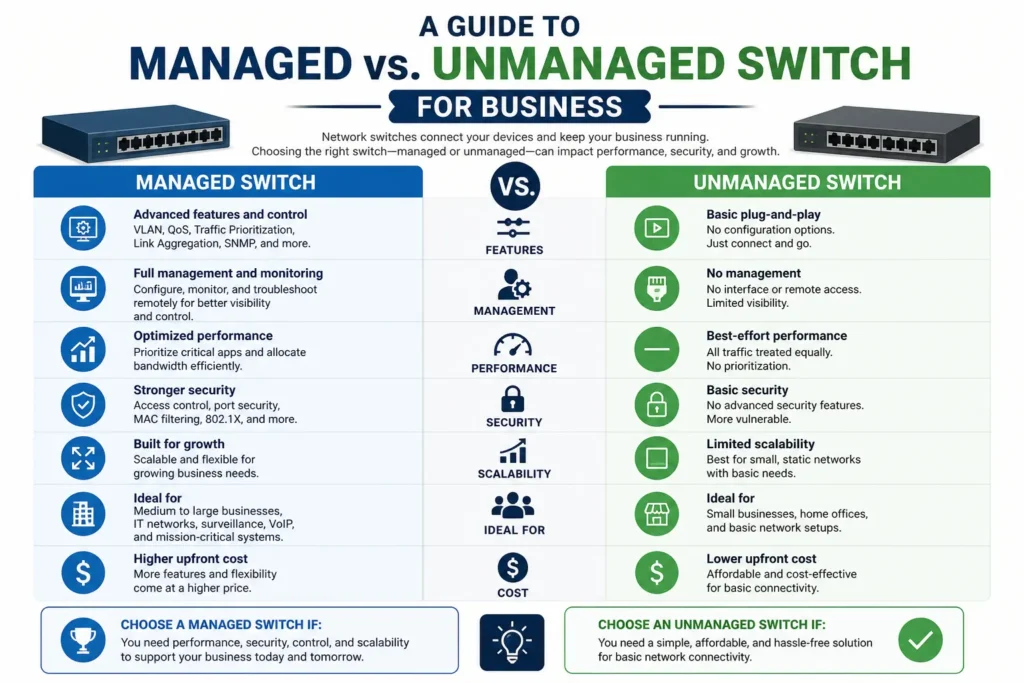
Unmanaged Switch
An unmanaged switch is a Layer 2 device with no configuration interface. You plug it in, it works, and every port behaves identically. All traffic is on the same network segment. There are no VLANs, no QoS priority rules, no port monitoring, no access controls. Plug in eight devices, they all talk to each other and to your router. That’s it.
Reliability is generally excellent — there’s almost nothing to fail or misconfigure. Price is low. Setup time is zero. Support ceiling is also zero, which matters when your network grows.
Managed Switch
A managed switch gives you control over how traffic moves through every port. The key capabilities that matter commercially are:
- VLANs (Virtual LANs) — segment your network so that guest Wi-Fi, IP cameras, VoIP phones, and workstations run on logically separate networks even through the same physical switch
- QoS (Quality of Service) — prioritize VoIP and video traffic so a phone call doesn’t break up when someone downloads a large file
- Port mirroring — copy traffic from one port to another for monitoring and troubleshooting
- SNMP monitoring — let your IT management platform see switch health, port utilization, and errors
- 802.1X authentication — require devices to authenticate before they’re allowed on the network
- Spanning Tree Protocol control — manage redundant links without broadcast storms
- PoE budgeting per port — on PoE managed switches, control exactly how much power each port can deliver
Managed switches come in two flavours: smart/web-managed (limited management via browser, cheaper) and fully managed (CLI + full feature set, enterprise-grade). For most commercial SMB environments in the GTA, smart/web-managed covers the use cases well. Fully managed belongs in data centres, multi-site enterprise environments, and anywhere a network engineer will be actively managing the infrastructure.
The Scenario-Based Answer You Were Looking For
Here is the honest answer, scenario by scenario. These are real situations we encounter on commercial installs.
Scenario 1: CCTV-Only Warehouse — Just IP Cameras and an NVR
Answer: Unmanaged. Full stop.
If your network is a dedicated CCTV network — IP cameras connecting to an NVR, with nothing else on it — an unmanaged PoE switch is the right call. There are no competing traffic types that need prioritization, no need to segment devices from each other, and no management complexity to justify the cost premium.
We install unmanaged PoE switches for dedicated CCTV runs constantly. Netgear GS308P, TP-Link TL-SG1210P, and Ubiquiti UniFi Flex Mini are common choices at different price points. They’re reliable, they power cameras properly, and they need zero configuration. We set them up, label the ports, and hand over clean documentation. Done.
The one caveat: if there’s any chance this CCTV network will eventually share infrastructure with other systems — even a single VoIP phone or a workstation — plan for managed from day one. Retrofitting VLANs onto an existing unmanaged network means replacing switches.
Scenario 2: Small Office, 10–20 Users, No VoIP
Answer: Unmanaged is probably fine. Smart-managed is a reasonable upgrade.
A 15-person office with workstations, a couple of printers, and a basic Wi-Fi access point doesn’t strictly need a managed switch. All devices are on the same network, there’s no traffic segmentation requirement, and the router handles internet access control.
That said, for a modest cost premium, a smart-managed switch gives you port-level visibility, the ability to set up a guest VLAN for client Wi-Fi later without replacing hardware, and basic monitoring. If the office has an IT provider managing the network remotely, they’ll prefer managed because they can troubleshoot without a site visit. We often recommend smart-managed in this scenario as a low-cost insurance policy against growth.
Scenario 3: Office with VoIP Phones + Workstations + Guest Wi-Fi
Answer: Managed. This is not negotiable.
As soon as VoIP phones enter the picture, you need QoS. Voice traffic is real-time and latency-sensitive — a 20ms delay spike caused by a file download will cause an audible break on a phone call. Without QoS, your phone system will work fine during low-traffic periods and degrade exactly when call quality matters most.
Add guest Wi-Fi and you need VLANs. You do not want guest devices on the same Layer 2 network as your workstations. A guest VLAN sends guest traffic directly to the internet without touching the internal network. This requires VLAN-capable switches and a VLAN-aware access point — neither of which works on an unmanaged switch.
The correct setup for this scenario: managed switch with QoS configured for VoIP traffic class, a separate VLAN for the phone system, and a dedicated guest VLAN on the wireless side. Your VoIP provider’s installation guide will specify the DSCP markings they use — set the switch to honour them.
Scenario 4: Warehouse with CCTV + WMS Terminals + Wi-Fi for Scanners + VoIP Intercom
Answer: Managed. Likely with multiple VLANs.
A typical GTA warehouse or distribution centre runs several systems over a shared network: IP cameras on a dedicated CCTV VLAN, WMS workstations and terminals on the operations VLAN, wireless access points carrying barcode scanner traffic on the production VLAN, and VoIP intercoms on the voice VLAN.
Running all of this on a single flat network creates security exposure (IP cameras can see WMS traffic), broadcast domain problems at scale, and QoS conflicts. A managed switch with four VLANs and QoS priority for VoIP traffic handles this cleanly. The PoE budget also needs to be managed — cameras, APs, and intercoms all drawing power from the same switch need port-level PoE allocation to avoid brownouts.
We’ve installed this setup many times in Brampton and Mississauga warehouses. The managed switch configuration takes longer upfront, but the network is stable, segmented, and documented — which matters when a WMS vendor needs to troubleshoot a connectivity issue at 11pm during a peak shipping period.
Need Network Cabling in Toronto?
Free onsite survey within 48 hours. TIA-568 certified, Fluke DSX tested every run.
Scenario 5: Medical or Healthcare Office
Answer: Managed. Compliance likely requires it.
Healthcare environments in Ontario are subject to PHIPA requirements around the protection of personal health information. Best-practice compliance frameworks require network segmentation that isolates systems handling PHI from general internet access and guest devices. An unmanaged switch cannot enforce any of this.
A managed switch allows you to put EMR/EHR workstations on an isolated VLAN with access control rules at the router/firewall, give clinical Wi-Fi its own VLAN with 802.1X authentication, and place CCTV on a dedicated VLAN with no access to patient data systems. This is the minimum segmentation an IT auditor or cyber insurance underwriter will expect to see.
Scenario 6: Retail Store — POS, Staff Wi-Fi, Customer Wi-Fi, CCTV
Answer: Managed. PCI DSS requirements drive this.
If your business processes card payments — which every retail and restaurant operation does — PCI DSS requires that cardholder data be isolated from other network traffic. Your POS system must be on a segregated network that cannot be reached from the customer Wi-Fi VLAN or the general staff network. An unmanaged switch cannot segment these environments.
A managed switch with three VLANs — POS/payments, staff/operations, and customer/guest — is the baseline PCI-compliant network architecture for retail. Your payment processor’s security compliance requirements will spell this out explicitly.
The Real Cost Difference
Let’s be concrete, because the cost argument is often overstated in both directions.
| Switch Type | Typical Price (8-port PoE) | Config Time |
|---|---|---|
| Unmanaged PoE (Netgear GS308P) | $80–$160 CAD | 0 minutes |
| Smart Managed PoE (Netgear GS308EP) | $150–$280 CAD | 30–90 minutes |
| Fully Managed PoE (Cisco SG350, Ubiquiti USW) | $300–$600+ CAD | 1–3 hours |
The hardware cost difference between unmanaged and smart-managed is typically $70–$120 per switch. Over a 20-port installation with two switches, the premium is $140–$240. The cost of replacing unmanaged switches when your requirements outgrow them — hardware, labour, downtime — is typically $800–$1,500 for a small commercial environment. Buying managed upfront in a scenario where you’ll need it is almost always cheaper over a 5-year horizon.
The cost of not buying managed when you need it — degraded VoIP quality, inability to segment a guest network, a failed PCI audit — is uncountable.
PoE: Where Managed Makes a Bigger Difference Than You Think
Most commercial installations involve PoE — cameras, access points, phones, and intercoms all draw power from the switch. Unmanaged PoE switches distribute power on a first-come-first-served basis with no intelligence. When total PoE demand exceeds the budget, ports start dropping in unpredictable order.
A managed switch with per-port PoE control lets you allocate exactly how much power each port can deliver, set priority so critical devices keep power even when the budget is hit, and monitor actual power draw per device. In a warehouse with 40+ cameras, 30+ APs, and 20+ intercoms, this level of control is the difference between a stable system and one with random camera dropouts when power demand spikes.
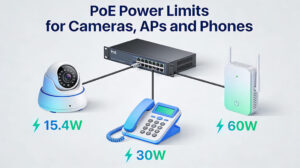
Related reading: PoE Power Limits for Cameras, APs and Phones
Smart Managed vs. Fully Managed: The Feature Comparison
| Feature | Unmanaged | Smart Managed | Fully Managed |
|---|---|---|---|
| VLANs | No | Yes (802.1Q) | Yes (full 802.1Q + QinQ) |
| QoS / Traffic Priority | No | Basic (4 queues) | Full DSCP, CoS, per-queue shaping |
| Port Mirroring | No | Yes (basic) | Yes (full RSPAN/ERSPAN) |
| SNMP Monitoring | No | SNMPv1/v2c | SNMPv3 + full MIB |
| 802.1X Auth | No | Sometimes | Yes |
| CLI Access | No | No (web only) | Yes (SSH + serial) |
| Stacking | No | No | Vendor-dependent |
| Layer 3 Routing | No | No | Some models |
For a 50-person Toronto office with VoIP, guest Wi-Fi, and CCTV, a smart-managed switch from Netgear, TP-Link, or Ubiquiti handles every requirement. The limitation of no CLI access rarely matters unless you have a network engineer actively managing via command line — and most SMB environments don’t.
Fully managed switches (Cisco SG350/SG550, Ubiquiti UniFi Pro, Aruba Instant On) are worth the premium when: you have an IT provider needing CLI access for remote troubleshooting, you’re running multiple sites needing consistent policy, you have compliance requirements specifying enterprise-grade controls, or you’re running in a data centre environment.
The Installer’s Honest Brand Recommendations
Unmanaged
- Netgear GS3xx series — reliable, good PoE budget, our go-to for dedicated CCTV networks and simple office expansions.
- TP-Link TL-SG series — cost-effective for small unmanaged applications.
- Ubiquiti UniFi Flex Mini — good in Ubiquiti-managed environments where you want controller visibility without switch-level management.
Smart/Web Managed
- Netgear GS3xxEP Plus switches — excellent value, simple VLAN and QoS configuration, solid PoE. Most of our Toronto office installations in the 20–100 user range use these.
- TP-Link TL-SG2xxx series — competitive pricing, good VLAN support.
- Ubiquiti UniFi Standard/Pro switches — excellent if the whole environment is Ubiquiti. The UniFi controller makes multi-switch VLAN management much cleaner than per-switch web interfaces.
Fully Managed
- Cisco SG350/SG550 series — industry standard. CLI familiar to any network engineer, strong stability, comprehensive feature set.
- Cisco Catalyst 1000 series — for environments needing enterprise-grade logging, telemetry, and compliance documentation.
- Aruba Instant On — strong cloud-managed SMB option, competitive with Ubiquiti UniFi.
Common Mistakes We See on Commercial Installations
Buying Managed Switches Without Configuring Them
A managed switch running factory defaults behaves like an unmanaged switch. We’ve walked into commercial environments where someone bought managed hardware “for future use” and never configured VLANs or QoS. Phones were degrading, guest Wi-Fi was on the internal network, cameras were visible to workstations — exactly what managed switches prevent. Hardware without configuration is just an expensive unmanaged switch.
Using Consumer Switches in Commercial Environments
Consumer-grade switches from big-box stores have lower MTBF ratings, inadequate PoE budgets, and firmware that isn’t maintained for commercial security vulnerabilities. A $40 consumer switch in a 24/7 warehouse will fail significantly sooner than a commercial-grade unit. Buy commercial-grade switches from commercial distributors.
Undersizing the PoE Budget
The most common technical mistake we see. An 8-port switch rated for 65W total, with 8 cameras each drawing 12W, is demanding 96W. The switch manages this by throttling ports randomly. Calculate total PoE draw from your device specs, add 20–30% headroom, and buy accordingly.
No Documentation
Whether managed or unmanaged, document every port: VLAN assignments, IP addresses, device types, MAC addresses. When something fails at 2am and your IT provider is troubleshooting remotely, a port-by-port record is the difference between a 15-minute fix and a 3-hour outage investigation. We deliver port documentation on every switch install we do.
The Decision Framework
Apply this filter in order:
- Dedicated single-purpose network (cameras only, or workstations only)? → Unmanaged
- Network carries VoIP phone traffic? → Managed (QoS required)
- Network needs guest Wi-Fi? → Managed (VLAN required)
- Network handles payment card data (retail, restaurant, hotel)? → Managed (PCI DSS)
- Environment handles personal health information? → Managed (PHIPA compliance)
- Expect to add VoIP, cameras, or guest Wi-Fi within 3 years? → Managed now (avoids switch replacement cost)
- None of the above apply? → Unmanaged is fine. Smart-managed is a low-cost upgrade for future flexibility.
What This Means for Cabling Planning
The switch choice should be made before cabling is run, not after. Managed switches require access to a configuration interface — typically via a dedicated management VLAN or port — which may affect your IDF/MDF layout. If you’re running a dedicated CCTV network on separate cabling (which we often recommend), you can use unmanaged switches on that network even if the main office uses managed.
PoE switch placement affects cable run lengths. A 90m Cat6A run to a camera terminates in a patch panel fine. A 100m run exceeds TIA-568 limits and a poorly-placed PoE injector won’t fix the underlying signal integrity problem. Plan IDF locations before finalizing switch placement.
Related reading: Cat6 Cabling for Commercial Environments | Fiber Optic Backbone for Multi-Floor Buildings
Bottom Line
Managed vs. unmanaged is not a question of budget — it’s a question of what the network is being asked to do. A $90 unmanaged switch is the correct choice for a dedicated 8-camera CCTV network. A $280 smart-managed switch is the correct choice for an office with VoIP and guest Wi-Fi. Buying the wrong one in either direction costs more than the switch itself.
If you’re planning a new commercial cabling installation in Toronto, Mississauga, Brampton, or the surrounding GTA and you’re not sure which switch infrastructure fits your environment, that’s part of what we scope during the free site survey. We’ll tell you what you actually need.