
A wired network is supposed to be the reliable part of your infrastructure. No RF contention, no coverage gaps, no handoff issues. When it starts behaving like a congested wireless link, the instinct is to call the ISP. That is the wrong first call about half the time. The performance ceiling on your network is set by every component in the chain, from the switch port all the way back to the punchdown block in the telecom room. Any one of those components can be the constraint.
This guide covers ten specific causes of slow wired performance. Each one is something you can investigate, test, or correct without guessing. Work through them systematically before escalating to the carrier.
1. Outdated Cable Category
Cat5e is still the most common cable in older commercial buildings. It is rated for 1000BASE-T at 100 m and can support 10GBASE-T at very short distances under ideal conditions, but it is not a practical 10G medium. If your users are on gigabit NICs and your switches have 10G uplinks, Cat5e is not your bottleneck at the access layer. But if you are pushing 10GBASE-T to the desktop or running high-bitrate IP cameras, you need to know what is in the ceiling.
Cat6 supports 10GBASE-T up to 55 m under ANSI/TIA-568.2-D. Cat6A extends that to the full 90 m horizontal channel limit, which is why most new commercial installations spec Cat6A by default. The 45 m restriction on Cat6 for 10G is frequently overlooked in design, and it becomes a real problem when a run turns out to be 60 m after accounting for the actual cable path. If you are planning 10G to the desk or to access points running Wi-Fi 6E or Wi-Fi 7, Cat6A is the correct choice.
2. Physical Cable Damage
A damaged cable rarely fails completely. It degrades. You see CRC errors climbing on the switch port, auto-negotiation dropping from 1G to 100M, or a connection that works fine for an hour and then falls over. These are the signatures of a marginal physical layer.
Common damage sources in commercial environments include cables stapled too tightly during a retrofit, runs pinched in a dropped ceiling tile, cables bent sharply around a conduit corner, or simply age-related jacket degradation on older Cat3 or Cat5 runs. Terminations are a separate failure mode. A punchdown that did not seat fully, an RJ45 plug with a broken locking tab that has been reseated hundreds of times, or a keystoned jack with excessive untwist at the termination point will all show up on a proper channel test. Camera and access point runs finished with a crimped plug on solid cable are a common source of these faults, which is why those runs should use field-termination plugs certified as modular plug terminated links. A link-light does not tell you any of this. A Fluke DSX or similar field certifier will.
3. Cable Runs Exceeding the Channel Limit
ANSI/TIA-568.2-D sets the horizontal channel at 90 m of permanent link plus up to 10 m of combined patch cord allowance, for a 100 m total. That number is not a suggestion. Beyond 100 m, insertion loss exceeds the standard’s limit, and the link will either negotiate down or fail to negotiate at all.
In warehouses and large open-plan floors, it is common to find horizontal runs that exceed 90 m because the telecom room was placed at one end of the building without accounting for the actual routing distance. The fix is either a new intermediate distribution frame closer to the far end or a fiber backbone with a media converter or remote switch. Running fiber from the main distribution frame to a remote switch and then short copper horizontals is the correct architecture for large footprints. OM4 multimode handles 400 m for 10GBASE-SR and up to 150 m for 100GBASE-SR4, which is more than enough for any building backbone.
4. Electromagnetic Interference
Unshielded twisted pair depends on the twist to cancel common-mode noise. That works well under normal conditions. It works less well when the cable is routed in parallel with 120V or 240V electrical conductors for a significant distance, or when it passes through a panel room with large transformers or variable-frequency motor drives.
TIA-568.2-D requires a minimum 50 mm separation between data cables and power conductors where they run in parallel. In environments with heavy industrial equipment, that separation alone may not be sufficient. The practical options are shielded cabling (F/UTP or S/FTP with a properly bonded shield ground) or fiber, which is immune to EMI entirely. For security camera runs near loading docks or mechanical rooms, fiber to a local switch is often the cleaner long-term solution than trying to manage interference on copper.
5. Network Equipment as the Bottleneck
This one gets missed because people assume if the switch port shows a link it is performing correctly. Check the actual negotiated speed on the port. A 10/100/1000 switch negotiating at 100M because of a bad cable or a legacy NIC is a very common problem. Also check switch uplinks. A 48-port access switch with a 1G uplink to the core is going to saturate that uplink during a busy morning when 30 users are all pulling data from the file server simultaneously. The math is not complicated.
Switches manufactured before 2015 are worth auditing. Many older managed switches have hardware forwarding ASICs that cannot keep up with line-rate traffic across all ports simultaneously. The rated port speed and the actual switching capacity are two different numbers. Check the backplane capacity against the aggregate port bandwidth and look for blocking architectures.
6. Too Many Devices on Shared Segments
Modern IP networks carry more device types than they did ten years ago. A typical medium-sized office today might have workstations, VoIP handsets, IP cameras, wireless access points, door controllers, badge readers, building automation controllers, and printers all on the same switched infrastructure. Each of those device categories has its own traffic profile and latency sensitivity.
VoIP is particularly sensitive to latency and jitter. IP cameras can generate steady high-bitrate streams, 4 to 8 Mbps per camera for 4K, that can saturate uplinks if not managed. The correct approach is VLAN segmentation to isolate traffic types, QoS policies to prioritize time-sensitive traffic, and proper capacity planning on uplinks. Running everything flat on one VLAN is a design problem, not just a performance problem. It is also a security problem.
Need Network Cabling in Toronto?
Free onsite survey within 48 hours. Fluke DSX tested to TIA-568 limits.
PoE device density also affects copper performance. Under TIA TSB-184-A, bundled PoE cables carrying sustained current generate heat that raises conductor temperature and increases insertion loss. A bundle of 24 Cat6A cables each delivering 802.3bt (PoE++ at up to 90 W) can see a measurable insertion loss increase that affects high-frequency performance. This is relevant when you are deploying high-density PoE switches feeding wireless access points or PTZ cameras from tray-routed bundles.
7. Poor-Quality Patch Cables
The permanent link in the wall might be certified Cat6A, but if the patch cord connecting the switch to the patch panel is a generic unrated cable from a bin, the channel is no longer compliant. Patch cords are part of the channel. They are tested as part of the channel under ANSI/TIA-568.2-D.
This is a more common problem than it should be. Facilities staff replace patch cords with whatever is on hand. Someone orders bulk patch cables from a distributor without checking the specification. The result is a channel that fails near-end crosstalk or return loss at the frequency ranges that matter for 10G. For critical connections, use factory-terminated patch cords from a manufacturer that publishes third-party test data. For data centers, plenum-rated or LSZH cords where required. Label them and track them.
8. Disorganized or Overheated Telecom Rooms
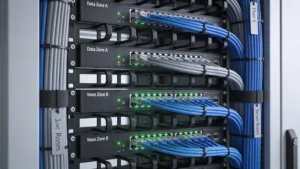
Cable management is not an aesthetic concern. An IDF that looks like a bowl of spaghetti is one where you will accidentally pull the wrong patch cord during troubleshooting, where finding the source of a flapping link takes 40 minutes instead than 4, and where undocumented cables never get removed because nobody knows what they connect.
Heat is a separate issue. Switches, patch panels, and UPS units in an enclosed closet without active cooling will run hot. Most managed switches derate performance or enter protection modes above 45C or 50C. If your IDF has no dedicated cooling and is in an interior room with no airflow, measure the ambient temperature. This is a common root cause in small to medium office environments where the telecom closet is a repurposed storage room.
9. Incorrect Installation Practices
The most common installation error on copper is excessive untwist at the termination point. ANSI/TIA-568.2-D allows a maximum of 13 mm of untwist for Cat6 and Cat6A at the termination. Exceeding that degrades near-end crosstalk at high frequencies, and the degradation is proportional to the excess. It will not show up on a basic continuity test. It will show up on a full channel certification with a calibrated tester.
Other common problems include exceeding the cable’s minimum bend radius (typically 4x the cable diameter for Cat6A), pulling with excessive tension which can permanently stretch the pairs, and using Cat6 components in a Cat6A channel. Channel component matching matters. Mixing a Cat6 keystone into a Cat6A channel degrades the entire channel to Cat6 performance. This is specified in ANSI/TIA-568.2-D and is not a gray area.
10. The Internet Connection Itself
If internal file transfers between local servers are fast but internet-dependent applications are slow, the LAN is not your problem. Measure this explicitly. Copy a large file between two machines on the same switch and compare the throughput to a download from an external server. If the internal transfer is at or near your expected link speed and the internet transfer is slow, the constraint is either the WAN connection or the router/firewall processing it.
Check whether the contracted bandwidth matches your actual demand. A 500 Mbps symmetric fiber connection shared across 80 users running video conferencing and cloud applications will saturate during peak hours. Also check your router’s CPU utilization during slow periods. Firewalls performing deep packet inspection, IDS, or VPN encryption at scale will max out their processing capacity before they max out their physical ports, and the result looks identical to a slow internet connection.
| Cause | How to Confirm | Fix |
|---|---|---|
| Outdated cable category | Check installed cable label or channel certification report | Recable to Cat6A for new installations or 10G requirements |
| Physical cable damage | Field certifier (insertion loss, NEXT, return loss) | Replace failed runs, re-terminate connectors |
| Excessive run length | Measure channel length with certifier | Add IDF or convert to fiber backbone with remote switch |
| EMI | Check routing near power, audit error counters on switch ports | Re-route, increase separation, use shielded cable or fiber |
| Slow network equipment | Check negotiated port speed, switch backplane capacity | Upgrade switches, add uplink capacity |
| Device overload | Monitor switch port utilization, check uplink saturation | VLAN segmentation, QoS, uplink upgrade |
| Poor patch cables | Include patch cords in channel certification | Replace with rated, tested factory cords |
| Disorganized or hot IDF | Visual audit, ambient temperature measurement | Cable management cleanup, add active cooling |
| Bad installation | Full channel certification to ANSI/TIA-568.2-D | Re-terminate or replace non-compliant runs |
| Internet connection | Compare LAN vs. WAN throughput, check router CPU | Upgrade WAN circuit or firewall hardware |
How to Actually Find the Problem
Speed tests from a workstation browser tell you almost nothing about the physical layer. They measure end-to-end throughput at a point in time, including every variable from NIC driver to server load on the test host. They do not tell you whether your cable plant is compliant, where the error rate is highest, or whether your switch is saturating its uplink.
Useful diagnostic steps in order: check switch port statistics for input and output errors, CRC errors, and runts on affected ports. These point directly at physical layer problems. Check negotiated speed on every port in the affected area. Run an internal file transfer to isolate LAN from WAN. Then, if physical layer issues are suspected, bring in a field certifier. A proper channel certification to ANSI/TIA-568.2-D measures wire map, length, insertion loss, NEXT, PS-NEXT, ACR-F, PS-ACR-F, and return loss. That is the only test that definitively clears or condemns a copper channel. A visual inspection and a continuity tester do not come close.
Document everything as you go. If you are finding problems in a building with aging infrastructure, the test report becomes the business case for a cabling upgrade and gives you an accurate scope before any contractor quotes the work.
Frequently Asked Questions
Planning a cabling project in the GTA?
Velocity Cabling designs and installs structured cabling, fiber, and security systems for businesses across Toronto, Mississauga, Brampton, and the surrounding area.