
Cable Testing & Certification in Toronto & the GTA
We certify copper and fiber cabling on a Fluke DSX CableAnalyzer: new installs, cabling that came with your lease, and runs that keep dropping. Every link gets a pass or fail against TIA-568 limits, and every failure gets a cause and a fix.
A lot of the cabling we are asked to test is cabling nobody can vouch for: runs that came with a leased suite, a new install handed over without results, or a building full of Cat5e that is about to carry multi-gig access points. A simple tester will tell you the wires are connected. A certification tells you whether each link meets its category, and when it does not, why. Velocity Cabling certifies every copper link we install on a Fluke DSX CableAnalyzer, and we bring the same tester to cabling we did not install.
Testing, Qualifying And Certifying.
“Tested” can mean three very different things, and the cheapest of them is the one most often handed over at the end of a job. Before you accept a set of results, check which kind they are.
| Level | What it answers | When it is enough |
|---|---|---|
| Verification | Are all eight wires connected to the right pins at both ends? Catches opens, shorts and crossed pairs. | Checking a patch cord, or confirming a run before the real test. |
| Qualification | Will this link carry a particular speed, such as 1 Gb/s Ethernet, right now? | Troubleshooting a single link or moving one desk. |
| Certification | Does the link meet every limit for its category, such as Cat6 or Cat6A, under the TIA-568 standard? | New installs, acceptance of someone else's work, warranties, and any decision about upgrading. |
A verification tester costs a few hundred dollars and fits in a pocket. A certification tester costs many times that and has to be calibrated, which is why some installers stop at a continuity check. A split pair, where wires from two pairs are swapped at both ends, passes a continuity check and still fails certification, because the twist that cancels crosstalk no longer lines up.
What A Certification Measures.
The DSX sends test signals across the full frequency range of the category and measures how the link responds on every pair. Each result is compared to the TIA-568 limit for that category. These are the measurements that decide a pass or a fail.
Every conductor to the right pin at both ends. Flags opens, shorts, crossed, reversed and split pairs.
Measured on each pair. A permanent link is limited to 90 metres, and the full channel with patch cords to 100.
How much signal is lost along the run. It rises with length, heat and poor-quality cable.
Crosstalk from one pair onto another at the near end, and from all three other pairs combined. Usually caused by untwisting at a termination.
Signal reflected back toward the sender by kinks, crushed cable, poor terminations or mismatched parts.
Crosstalk measured at the far end, compared with the signal that arrives there. Matters most at 10 Gb/s.
How long the signal takes to cross each pair, and the difference between the fastest and slowest pair.
Uneven DC resistance within a pair or between pairs. It does not stop data, but it upsets PoE power delivery.

Permanent link or channel
A permanent link test covers the fixed part of the cabling, from the patch panel to the wall or ceiling outlet, and leaves the patch cords out. It is the right test for new installs, because cords get swapped over the life of the system. A channel test includes the patch cords at both ends and measures the whole path a device actually uses. We use it on existing cabling where the cords stay in place, and when chasing a fault that might be in a cord rather than the run.
Marginal results
A result shown with an asterisk, such as PASS*, sits within the tester's accuracy range of the limit. Technically it may still pass, but it has no margin left. On our own installs a marginal link is re-terminated and retested before the report is produced. On cabling we are recertifying, marginal links are flagged separately so you can see which ones are close to failing.
Recertifying Existing Cabling.
Recertification is the same test we run on a new install, applied to cabling that is already in the walls. It is worth doing whenever you are about to depend on cabling you cannot vouch for.
When nothing is labelled
Inherited cabling often has no labels, or labels that no longer match the panel. We identify each run as we test it and label both ends to TIA-606, so the report, the panel and the outlets finally agree. On a messy rack, the testing and a rack cleanup can be done in the same visit.
About warranties. Manufacturer system warranties are registered by the certified installer at the time of installation. A recertification report cannot create one for cabling someone else installed, and anyone who offers that should be asked to show the registration. What a recertification does give you is current, link-by-link proof of how the cabling performs, which is what you need before you rely on it.
Before Wi-Fi And Multi-Gig Upgrades.
New access points and switches are often bought on the assumption that the existing cable will carry them. The Ethernet standards say what each category of cable is designed for. Whether your particular runs live up to it depends on how they were installed and what has happened to them since.
| Speed | Designed to run on | Distance |
|---|---|---|
| 1 Gb/s | Cat5e and up | 100 m |
| 2.5 Gb/s | Cat5e and up | 100 m |
| 5 Gb/s | Cat6 and up | 100 m |
| 10 Gb/s | Cat6 | Up to 55 m |
| 10 Gb/s | Cat6A | 100 m |
Many current Wi-Fi 6E and Wi-Fi 7 access points uplink at 2.5 or 5 Gb/s, so Cat5e and Cat6 runs in good condition can often stay. The runs that let you down are the ones with loose terminations, kinks from a careless pull, or long bundles packed tight in a hot ceiling. Certifying just the runs to the access point locations, before you order switches, separates the ones that will work from the ones that need replacing. Why Cat6 stops at 55 metres for 10 Gb/s is covered in this article, and where new runs are needed, see our Cat6A cabling page.
PoE needs balanced pairs
Power over Ethernet sends current down the same pairs as the data. When the resistance of the two wires in a pair is uneven, the current splits unevenly, and high-power devices such as PTZ cameras and newer access points can reboot or refuse to power up. The DSX measures resistance unbalance on every pair, so a link that passes for data but will struggle with power shows up before the device is mounted. For planning the power side, see how to plan PoE for cameras, access points and phones, and our Wi-Fi installation page for the access point work.
Finding Faults.
Intermittent network problems get blamed on switches, drivers and the internet provider long before anyone looks at the cable. A certification test settles it one way or the other. These are the symptoms we get called about most, and what the test usually finds.
| Symptom | Likely cause | What the test shows |
|---|---|---|
| Computer connects at 100 Mb/s instead of 1 Gb/s | One of the four pairs is open or damaged, so the link falls back to the two pairs that work. | An open pair on the wiremap, with the distance to the break. |
| Port drops when the cord or desk is moved | A loose or badly punched-down jack. | Crosstalk or return loss failing at the outlet end. |
| PoE camera or access point keeps rebooting | Uneven resistance from a poor termination, or a run near its length limit. | Resistance unbalance or length failures on the affected pairs. |
| Link is up but slow, with errors on the switch port | Pairs untwisted too far at a termination, or a split pair. | A NEXT failure, located at the end where it occurs. |
| Outlets went dead after a renovation | Cable cut, crushed or stapled by another trade. | An open or short, with the distance from the panel to the damage. |
| Fine at 1 Gb/s, unstable at 10 Gb/s | Cat6 run longer than 55 metres, or cable that was never rated for it. | Insertion loss or crosstalk failures against the higher-speed limits. |
Distance to the fault
The DSX does more than report a fail. Its diagnostics plot where along the run the reflection or crosstalk happens, measured in metres from the tester. That tells us whether the problem is at the jack, at the panel or somewhere in the ceiling, so we open one ceiling tile instead of pulling the whole run. When the problem is not the cable at all, we say so, and your IT team can stop looking at it.
Repair and retest
Many failures turn out to be at the ends of the run, where a jack or a panel port can be re-terminated in minutes. Damaged cable is replaced. Either way, the repaired link is certified again and the passing result replaces the failure in your report. More causes of a slow wired network, cable and otherwise, are in our article on why a wired network runs slowly.
Fiber Testing.
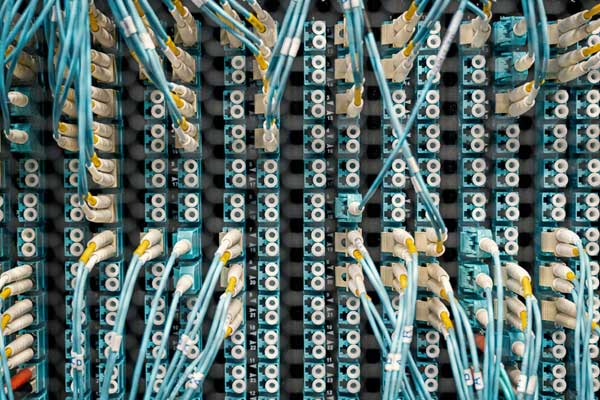
Every fiber strand gets an end-to-end loss test, compared against the loss budget for the link and the equipment it will carry. Where the job calls for it we add OTDR traces, which show the position and loss of every connector and splice along the run. Connector end faces are inspected before anything is mated, because a dirty connector is the most common cause of a failed fiber test. The detail of each test level is on our fiber splicing and termination page.
Will the old backbone carry 10 Gb/s?
Older buildings often have multimode backbones that predate 10 Gb/s. The fiber type, usually printed on the jacket, sets how far 10 Gb/s will reach. Testing confirms the type and the loss, so you know whether the strands you have will carry the new switches before you buy optics.
| Fiber | 1 Gb/s | 10 Gb/s |
|---|---|---|
| OM1 multimode | 275 m | 33 m |
| OM2 multimode | 550 m | 82 m |
| OM3 multimode | 550 m | 300 m |
| OM4 multimode | 550 m | 400 m |
| OS2 single-mode | Kilometres | Kilometres |
Reports You Can Use.
A report is only useful if someone can find a link in it two years from now. Every testing job ends with the same set of records.

The same records go into the handover for every network cabling job we install, so new work and recertified work end up documented the same way.
What Drives The Cost.
The test itself takes seconds per link. Most of the time goes into getting to each end of each run, so the cost depends more on the building than on the tester. Every job gets an itemized written price before any work starts.
The starting point. Testing a whole floor costs less per link than a handful of scattered outlets.
Labelled cabling goes quickly. Unlabelled runs have to be identified and labelled as we go.
Locked offices, occupied desks and outlets above ceilings or behind furniture all add time.
Fiber loss testing and OTDR traces are priced per strand on top of the copper.
Testing a live office after hours or on weekends keeps people working but costs more than daytime access.
Re-terminations and replacement runs are quoted separately once the test shows what is needed.
Find out what your cabling can really do.
Tell us how many links, where they are and what you are planning to run on them. We send an itemized price, and site surveys are booked within 48 hours.
Cable Testing Questions.
A basic tester checks that each wire is connected to the right pin. Certification measures how the whole link performs, including loss, crosstalk and reflections, and compares every result to the published limits for its category, such as Cat6 or Cat6A. Only a certification report shows that a link meets its category, and it is the only kind of result cabling manufacturers accept for a system warranty.
Yes. We test it exactly as we test our own work, link by link on a Fluke DSX against TIA-568 limits. You get a report showing which links pass, which fail and why, so you can decide what to repair before the cabling goes into service.
No. Manufacturer system warranties are registered by the certified installer when the cabling is installed. A recertification report cannot create one after the fact. What it does give you is current proof of how every link performs, which is what you need before you rely on the cabling or upgrade the equipment on it.
Each link has to be unplugged at both ends while it is tested, but only for the minute or so the test takes, and then it is patched straight back. We work through the building a section at a time, or after hours and on weekends, so the rest of the network stays up.
We record the cause, and the DSX diagnostics usually show where along the run the fault is. Many failures turn out to be at a jack or a panel port, which can be re-terminated and retested. Where the cable itself is damaged, the run is replaced. Repairs are quoted separately, and every repaired link is retested and added to the report.
Often, yes. The 2.5 Gb/s standard was written to run on Cat5e and the 5 Gb/s standard on Cat6, both to 100 metres. Older runs can still fall short because of poor terminations, damage or heavy bundling. Certifying the runs to the access point locations before you buy multi-gig switches tells you which ones will work and which need replacing.
Yes. Every fiber strand is loss tested end to end, with OTDR traces where the job calls for them, and connector end faces are inspected before anything is mated. The results go into the same report as the copper.
Toronto, Mississauga, Brampton, Caledon, Vaughan, Markham, Scarborough, Etobicoke, Oakville, Hamilton, Kitchener-Waterloo, Guelph, Whitby, Pickering and Ajax. Larger multi-site jobs elsewhere in Southern Ontario are quoted case by case.
Toronto, The GTA & Southern Ontario.
Crews dispatch from our Toronto base and reach most GTA sites within an hour.

Know What Is In Your Walls. Get It Certified.
Fluke DSX certification for new and existing cabling across Toronto and the GTA. Site survey booked within 48 hours, itemized price before we start.
Mon–Fri 8am–10pm · Evening & weekend installs available · Toronto, GTA & Southern Ontario