
A well-designed rack is one of the most underrated parts of a small business network. Get the layout wrong and you end up with a cabinet that’s hard to troubleshoot, runs hot, and becomes a liability every time something needs to change. Get it right and the whole system, from VoIP phones to IP cameras to workstations, runs reliably for years without a service call.
This guide walks through how to build a clean, functional small business network rack from scratch. The examples target 12 to 24 port environments, which cover the vast majority of small offices, retail units, and branch locations. The same principles scale up without any fundamental change to the approach.
Rack Layout: The Basic Hierarchy
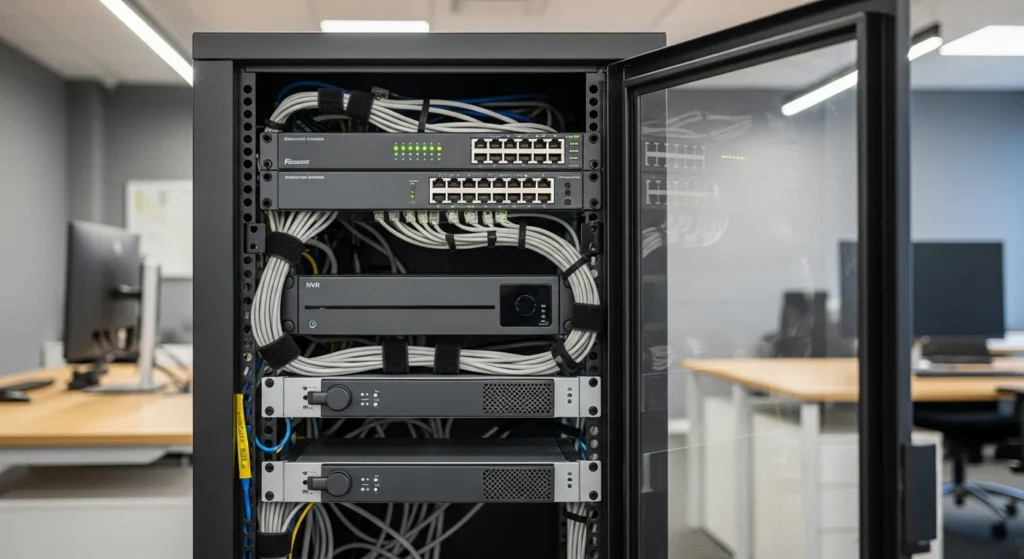
The guiding rule is simple: termination at the top, active switching in the middle, high-draw equipment at the bottom. This keeps your patch cords short, your cable runs organized, and your heavier gear on a stable shelf rather than hanging from rack ears.
A standard 12U to 16U wall-mount or floor-standing cabinet is sufficient for most small offices. Here is the order of equipment from top to bottom:
1U Patch Panel (top) — All horizontal runs from workstations, IP phones, cameras, and WAPs terminate here first. Use a 24-port Cat6 or Cat6A patch panel depending on your cable plant. If your runs exceed 85 m or you are targeting 10GBASE-T, use Cat6A throughout. ANSI/TIA-568.2-D sets the horizontal channel limit at 90 m total, with no more than 10 m combined for patch cords and equipment cords at each end.
1U Horizontal Cable Manager — Install one directly below the patch panel. This keeps patch cords dressed and separated from the switch ports below.
1U or 2U Managed PoE Switch — Sits directly below the cable manager so patch cords from the panel drop straight into the switch with minimal slack. Keep patch cord lengths to 1 m or 1.5 m. Anything longer creates bulk you will regret.
1U Horizontal Cable Manager — Another one below the switch. This separates the switch’s downlink patch cords from the power cabling further down.
Firewall/Router — One rack unit. This is typically a 1U appliance. The WAN connection from your ISP terminates here. A short Cat6 patch cord runs from the firewall’s LAN port up to an uplink port on the switch above.
NVR (Network Video Recorder) — Positioned below the firewall. NVRs generate significant heat and can weigh 5 to 10 kg depending on the drive count. Keep them low in the rack for stability and airflow. If your NVR is a tower unit, use a 2U shelf rather than rail-mounting it.
UPS (Uninterruptible Power Supply) — Bottom of the rack. The UPS is the heaviest single item in the cabinet, often 15 to 25 kg for a 1500 VA unit. Floor-standing racks handle this without issue. Wall-mount cabinets require you to check the manufacturer’s rated load capacity before installing any UPS heavier than 10 kg.
PoE Budget and Switch Selection
Before you pick a switch, calculate the actual PoE load. Phones, cameras, and WAPs all draw power from the switch, and undersizing the PoE budget is one of the most common mistakes in small business deployments.
| Device Type | IEEE Standard | Max Power at PSE | Typical Device |
|---|---|---|---|
| PoE | 802.3af | 15.4 W | VoIP phone, low-draw camera |
| PoE+ | 802.3at | 30 W | PTZ camera, enterprise WAP |
| PoE++ | 802.3bt Type 3 | 60 W | High-density WAP, video phone |
| PoE++ Type 4 | 802.3bt Type 4 | 100 W | Thin clients, specialty devices |
For a 24-port deployment with 8 phones at 7 W each, 6 cameras at 12 W each, and 2 WAPs at 25 W each, your actual draw is roughly 178 W. A switch rated at 185 W total PoE budget is too close to the ceiling. Size to at least 250 W for that scenario. When cables are bundled together, heat buildup in the jacket can reduce current capacity. TIA TSB-184-A covers temperature rise in bundled PoE cabling and is the correct reference for this. It is not uncommon for a 24-port PoE switch to require derating on densely bundled runs.
UPS Sizing for the Full Rack
Add up the wattage of every device in the cabinet: switch (including PoE load), firewall, NVR, and any other powered equipment. Multiply the total by 1.25 to give yourself a 25% headroom buffer, then select a UPS whose VA rating matches or exceeds that figure at the manufacturer’s stated power factor. A typical 24-port PoE switch with full camera and phone load, a firewall, and an NVR with four drives will draw somewhere between 350 W and 500 W. A 1000 VA to 1500 VA line-interactive UPS covers that range comfortably and provides 10 to 20 minutes of runtime, enough for a clean shutdown or a generator to come online.
Need Network Cabling in Toronto?
Free onsite survey within 48 hours. Fluke DSX tested to TIA-568 limits.
Use a managed UPS with a network card or USB management port. This lets the NVR and any servers shut down gracefully on loss of power without manual intervention.
Cooling and Airflow
Most small business racks live in a server closet or IDF room that was not originally designed for the purpose. Airflow matters. Switches and NVRs exhaust heat from front-to-back or side-to-side. Check your equipment’s airflow direction before racking it.
A closed wall-mount cabinet with no ventilation will throttle your switch and shorten NVR drive life. At minimum, install a 1U rack fan tray directly above the switch. If the closet itself has no HVAC supply, a small standalone portable AC unit or a split mini is worth the investment. Target ambient temperature inside the cabinet below 30 degrees Celsius. Most managed switches start dropping performance or logging thermal warnings above 40 degrees internal.
Leave at least 1U of blank panel space above and below the switch for airflow separation. Dense packing of equipment with no gaps accelerates heat buildup and is one of the primary causes of premature failure in small business racks.
Cable Management and Labeling
Horizontal cable managers are non-negotiable. One above and one below the switch. Use them. Every patch cord gets dressed through the finger ducts before connecting to a port. No freeform loops hanging in front of the switch face.
Velcro straps, not zip ties, on patch cords. Zip ties cinched tight deform the jacket geometry on Cat6 and Cat6A and can introduce return loss. It is a real problem and it shows up on a fluke tester.
For labeling, the simplest convention that holds up over time is a port number on the patch panel matched to a face plate number at the wall outlet, plus a device identifier at the patch cord. For example: patch panel port 04 connects to wall port WO-04 in the south conference room. The patch cord plugged into switch port 4 is labeled “WO-04 / Conf-S”. Anyone who picks up that cable knows exactly where it goes without chasing it through the rack.
Print labels from a dedicated cable label printer. Handwritten labels on tape are illegible within 18 months and they fall off in warm environments.
Example Rack Designs
12-Port Office: 8 PCs, 4 VoIP Phones, 1 WAP
A 12U wall-mount cabinet handles this cleanly. From top down: 1U 24-port Cat6 patch panel (only 13 ports used), 1U horizontal manager, 1U 24-port PoE+ managed switch with 185 W PoE budget (actual load around 65 W), 1U horizontal manager, 1U firewall appliance, 1U blank panel, 2U shelf for a compact NVR with four camera inputs, 2U 850 VA UPS at the bottom. That is 11U total with one U spare. Straightforward and serviceable.
24-Port Office: 16 PCs, 6 VoIP Phones, 6 IP Cameras, 2 WAPs
Move up to an 18U to 22U floor-standing rack. From top down: 1U 48-port Cat6A patch panel, 1U horizontal manager, 2U 48-port PoE+ managed switch with 370 W or higher PoE budget (actual load around 240 W), 1U horizontal manager, 1U 10G firewall or router, 1U blank panel, 1U fan tray, 2U NVR sized for 8 to 16 channels with drives appropriate to retention requirements (calculate storage as channels x resolution x bitrate x retention days), 1U PDU (rack mount power strip with surge, fed from UPS output), 2U 1500 VA UPS at the bottom. This layout leaves two to three U free for growth, which you will use within two years in almost every active office deployment.
VLAN Segmentation Note
Physical layout and logical layout need to match. Once the rack is built, configure VLANs on the managed switch to separate voice, data, cameras, and management traffic. Phones and cameras sharing a flat network with workstations is a security and performance problem regardless of how clean the rack looks. This is a switch configuration task, but it belongs in the rack design conversation because it affects which ports you label for which purpose and how you plan the patch panel port assignments from the start.
Frequently Asked Questions
Planning a cabling project in the GTA?
Velocity Cabling designs and installs structured cabling, fiber, and security systems for businesses across Toronto, Mississauga, Brampton, and the surrounding area.