
Most building owners start shopping for access control after something goes wrong. A key goes missing, a former employee still has building access, or an insurance review flags the front entrance. At that point the product catalogue can feel overwhelming. Smart readers, turnstiles, proximity cards, keypads, video intercoms, door entry software, metal detection equipment. It is a lot of hardware for what sounds like a simple goal: control who gets in.
This guide breaks the product categories down in plain terms so you can figure out what your building actually needs before you request quotes. If you already know the scope of your project, our access control system installation page covers how we handle design, wiring, programming and training as a single contractor.
Start with the doors, not the technology
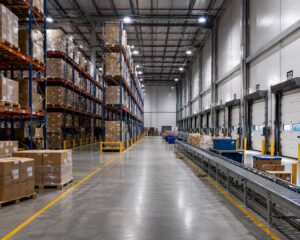
Before comparing brands, walk your building and count the openings you need to manage. A ten-door office in Etobicoke has different needs than a warehouse in Brampton with two loading bays, a staff entrance and a server room. For each door, note three things: who needs through it, how often, and what happens if the power fails. Those three answers drive almost every product decision below.
Also account for the cabling path. Every reader, lock and panel needs a home run back to a central location. Poor cable design is the most common reason an access control project runs over budget, which is why our low voltage cabling work and our access control work are quoted together rather than handed off between trades.
Keypads and readers
The reader is the part your staff touch every day, so it sets the tone for the whole system. PIN keypads are the cheapest option and work fine for a storage room or a back gate, but codes get shared and rarely get changed. Proximity readers, including the widely used HID and AWID formats, are the standard for most offices. Smart readers add encryption and support mobile credentials, so staff can unlock a door with their phone.
Biometric readers, using fingerprint or facial recognition, make sense where you cannot risk a credential being passed around. Think pharmacy stock rooms, cash handling areas and data centres. They cost more per door and need a clean surface and steady lighting, so they are usually reserved for a handful of critical openings rather than the whole building.
Credentials and card accessories
Credentials are the cards, fobs, tags and mobile passes your people carry. The main decision is between older 125 kHz proximity cards and newer 13.56 MHz smart cards. Legacy proximity cards are inexpensive and still common, but they can be cloned with equipment that costs very little. Smart cards use encryption and are the better choice for any new install.
Card accessories matter more than people expect. Reels, clips, lanyards and rigid badge holders determine whether a card lasts two years or gets replaced every four months. Budget for a small stock of spare credentials so a lost card on a Monday morning does not turn into a locksmith call.
Access control panels and accessories
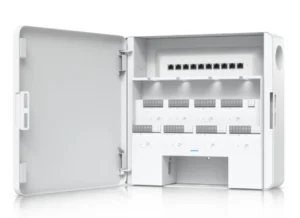
The panel is the brain. It stores your permission rules, makes the unlock decision and keeps the audit log. Panels are usually sized by door count, so a two-door controller suits a small suite while a larger board handles sixteen or more openings from one enclosure.
Two questions decide the panel choice. First, do you want the software running on a local server or in the cloud? Cloud platforms remove the server maintenance and let you manage several sites from one login, which suits businesses with multiple locations across the GTA. Second, how much room do you have to grow? Buying a panel with spare capacity is far cheaper than replacing one in three years.
Panel accessories include power supplies, backup batteries, enclosures and expansion boards. These are easy to under-spec. Undersized power supplies are a frequent cause of doors that behave strangely when several people badge in at once.
Locking devices and door hardware
This is where security meets fire code. Electric strikes replace the fixed strike plate on an existing frame and work well on standard commercial doors. Magnetic locks hold with several hundred pounds of force and suit glass entrances and doors with unusual frames. Electrified mortise locks and exit devices are more expensive but give you a cleaner installation on high traffic doors.
Fail-safe versus fail-secure is the decision that trips up most first-time buyers. A fail-safe lock releases when power is lost, which is required on many egress paths. A fail-secure lock stays locked, which protects an inventory room during an outage. The right answer depends on the opening and on the Ontario Building Code requirements for that door, and it should be confirmed on site rather than guessed from a floor plan.
Supporting door hardware includes closers, hinges, power transfer devices and door position switches. The position switch is small and often skipped, but it is what lets your software tell you a door was propped open at 2 a.m.
Egress devices and alarms
Every controlled door still needs a safe way out. Request-to-exit sensors, push-to-exit buttons, emergency release stations and delayed egress hardware all serve that purpose. Door prop alarms and forced entry alarms sit alongside them and turn your access system into something that reports problems instead of only recording them. Fire alarm integration is mandatory on magnetically locked doors, so plan for that interface early in the project.
Need Network Cabling in Toronto?
Free onsite survey within 48 hours. TIA-568 certified, Fluke DSX tested every run.
Access barriers, turnstiles and crowd control
Readers stop unauthorized credentials. They do not stop tailgating, where someone walks in behind an authorized person. If that is a real risk in your building, physical barriers are the answer. Optical turnstiles suit corporate lobbies where appearance matters. Full height turnstiles are better for industrial yards and parking structures. Retractable belt barriers and stanchions handle temporary queue management at reception or during events.
Metal detection products, including walk-through arches and handheld wands, come up in schools, courthouses, event venues and some healthcare settings. They are a screening tool rather than an access tool, but they usually get specified in the same project.
Video intercoms and touchless entry
Video intercoms handle visitors, deliveries and after-hours access without keeping someone at a front desk. Modern units send the call to a phone or desktop app, which works well for multi-tenant buildings and for offices running hybrid schedules.
Touchless access control grew quickly during the pandemic and stayed, mostly because people like it. Wave-to-exit sensors, mobile credentials that unlock over Bluetooth, and automatic door operators reduce shared contact points and improve accessibility at the same time. On accessible entrances, touchless hardware often satisfies two requirements with one product.
Pedestals, mounts and video badging
Pedestals and gooseneck mounts put a reader at driver height for parking gates and loading docks. Getting the height and setback right saves your staff from leaning out the window every morning.
Video badging covers the camera, software and card printer used to produce photo ID in house. For any site with more than about fifty employees, or with regular contractor turnover, printing badges yourself is faster and cheaper than ordering them from a supplier each time.
Software and licenses
Door entry software is what ties the hardware together. It manages cardholders, schedules, access levels, alarms and reports. Licensing usually scales by door count, user count or the number of connected sites, and some platforms charge separately for features like mobile credentials or visitor management.
Ask two questions of any platform before you commit. What does year three cost, once support renewals and credential fees are included? And can the system be serviced by more than one integrator, or are you locked to a single dealer? Clear answers to both will save you money later.
Putting a system together
A workable commercial system usually combines smart readers at main entrances, keypads or basic readers on interior doors, the right lock type for each opening, a panel with room to grow, egress hardware that meets code, and software your office manager can actually use. Physical barriers get added where tailgating is a genuine concern.
The wiring underneath all of it deserves the same attention as the hardware. Structured cabling installed to TIA-568 standards and tested on every run is what keeps a system stable for a decade instead of generating nuisance calls.
Talk to a local installer
Velocity Cabling designs and installs access control for commercial buildings across Toronto, Mississauga, Brampton, Vaughan, Markham, Scarborough, Etobicoke, Oakville, Hamilton, Whitby and Pickering. We handle the hardware, the cabling, the programming and the staff training under one contract, so there is no gap between trades when something needs fixing.
Call (647) 812-2640 or email info@velocitycabling.com to book a free onsite assessment. We schedule most site visits within 48 hours.
Frequently asked questions
How much does an access control system cost in Toronto? Pricing depends on door count, lock type and whether new cabling is required. A single controlled door with a proximity reader and electric strike sits at the low end, while a lobby with turnstiles and video intercom integration costs considerably more. A site visit is the only way to price it accurately.
Can I add access control to my existing doors? In most cases yes. Existing commercial doors and frames often accept an electric strike or magnetic lock with minor modification. Older wood doors and some glass entrances may need hardware changes, which we identify during the assessment.
Should I choose a cloud or on-premise system? Cloud platforms suit businesses with multiple sites or no in-house IT staff. On-premise systems suit organizations with strict data policies or existing server infrastructure. Both are reliable when installed properly.
What happens during a power outage? Panels run on backup batteries, typically for several hours. Individual doors behave according to their fail-safe or fail-secure configuration, which is set during design based on code requirements and your security priorities.